

How to Create a Token and Bundle Buy on Four.meme
How to Create a Token and Bundle Buy on Four.meme
Learn how to create a meme token on Four.meme and configure a Dev buy, up to 20 launch-phase wallets, and 5 PancakeSwap DEX wallets with CiaoTool.
Creating a meme coin on Four.Meme is straightforward, but managing the launch and initial purchases across multiple wallets can be time-consuming. Normally, you would create the token first, then switch wallets one by one to place separate buy transactions.
With CiaoTool's Four.Meme Create & Bundle Buy tool, you can configure token creation, a Dev buy, multiple bonding-curve buys, and later PancakeSwap buys in one workflow. The tool supports up to 20 wallets for the Four.Meme bonding curve and up to 5 wallets for the PancakeSwap stage.
This helps creators prepare their initial wallet allocation before launch, reduce repetitive wallet switching, and organize different wallets for legitimate project functions such as team reserves, operations, community incentives, and liquidity planning.
How Does Four.Meme Work?
Four.Meme is a meme-token launchpad on BNB Chain. Users can create a token and make it available for trading through the platform’s bonding-curve mechanism.
At launch, the token trades through Four.Meme’s internal liquidity pool. Buyers can acquire the token through the bonding curve, where the price changes algorithmically as buying and selling activity occurs.
As the bonding curve progresses, the liquidity collected during the launch phase is accumulated for the next stage. When the curve reaches the platform’s required completion threshold, liquidity is seeded into a PancakeSwap trading pair. This is commonly described as the token graduating from Four.Meme to PancakeSwap. Four.meme’s documentation describes the early pool as an internal liquidity pool and states that the platform establishes PancakeSwap liquidity through its seeding process after the pool reaches 100% progress.
For this guide:
- Bonding-curve buys refer to purchases made during the initial Four.Meme launch phase.
- PancakeSwap buys refer to purchases configured for the post-graduation DEX trading stage.
Four.meme Bundle Buy: Step-by-Step Guide
Before You Start
Before creating your Four.Meme token, prepare the following:
- A wallet compatible with BNB Chain, such as MetaMask.
- Enough BNB for token creation, the Dev buy, bonding-curve purchases, PancakeSwap purchases, service fees, and network gas.
- Your token name, symbol, description, logo, social links, and tags.
- A clear wallet plan, including how much BNB each wallet will use and what each wallet is intended to support.
- Separate wallets for project operations, community rewards, long-term reserves, and personal funds.
Step 1: Connect Your BNB Chain Wallet
Open CiaoTool's FourMeme Create & Bundle Buy page and connect the Dev wallet you will use to create the token.
Make sure your wallet is connected to BNB Chain Mainnet. Prepare enough BNB to cover token creation, the Dev buy, bonding-curve buys, PancakeSwap buys, and network gas fees.
Step 2: Enter Token Details
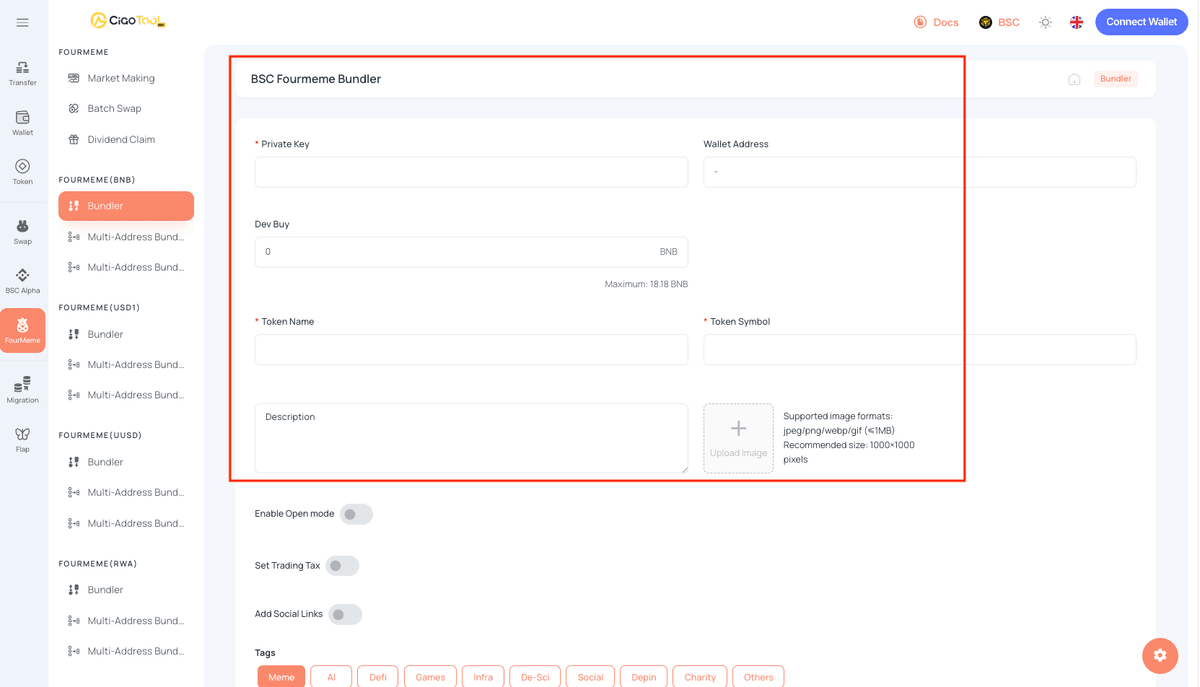
- Token name
- Token symbol
- Project description
- Token logo
- Website, X, Telegram, and other social links
- Tags
Depending on the token issuance configuration you select, you may see different options such as Open Mode and Transaction Tax.
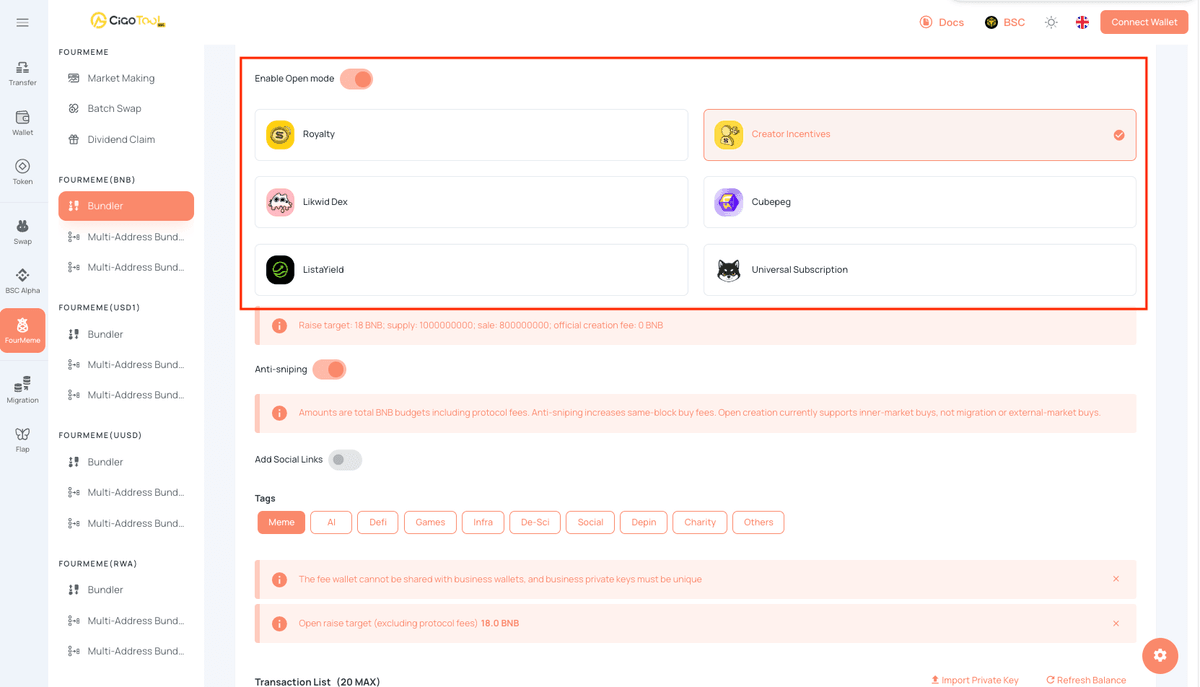
Open Mode
Open Mode is an open configuration option provided by Four.Meme for token issuance. Unlike a traditional fixed launch process, Open Mode allows you to select the corresponding certified contract and configuration based on different OpenFour issuance mechanisms.
Under Open Mode, the available issuance mechanisms may include 4STOCK, Royalty, Creator Incentives, Likwid Dex, Cubepeg, ListaYield, and Universal Subscription. Each mechanism is designed for different token issuance, fee distribution, incentive, or post-graduation trading and liquidity scenarios.
For example:
- 4STOCK: Designed for RWA / Stock Meme and other stock-themed token issuance scenarios.
- Royalty: Provides different on-chain fee distribution mechanisms.
- Creator Incentives: Introduces a fee mechanism designed around creator incentives.
- Likwid Dex: Connects with DeFi trading scenarios after token graduation.
- Cubepeg: Integrates token mechanisms with NFTs.
- ListaYield: Connects post-graduation liquidity with mechanisms related to ListaDEX.
- Universal Subscription: Uses a subscription-based token issuance model.
Selecting Open Mode does not mean that all OpenFour features will be enabled automatically. The available mechanisms, certified contracts, and corresponding parameters depend on the current configuration displayed by Four.Meme and CiaoTool.
Transaction Tax Settings
If the selected issuance configuration supports transaction tax, you may also see the corresponding tax parameters. The specific tax settings and how the collected tax is used may vary depending on the selected issuance mechanism and the current Four.Meme rules.
Before creating a token, it is recommended to review the parameters currently available under Open Mode and configure the token information, transaction tax, and other available options according to your launch plan.
Open Mode and Transaction Tax are separate configuration dimensions. Selecting Open Mode may change the functions and parameters displayed on the page compared with a standard issuance configuration. Always use the options currently available in the interface as the final reference.
Enter the initial BNB amount for the Dev wallet.
The Dev wallet creates the token and can also participate in the initial purchase. Keep enough BNB in the wallet to cover service fees and gas costs rather than using the entire wallet balance for the buy.
Step 4: Configure Bonding-Curve and PancakeSwap Wallets
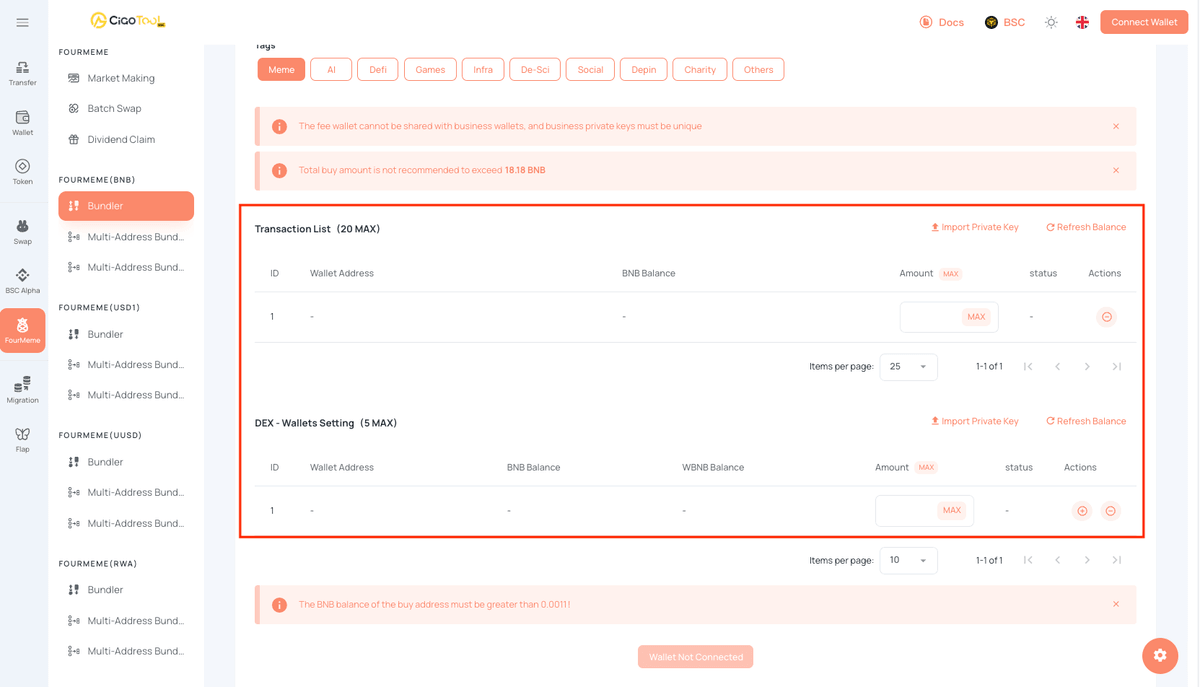
Add up to 20 bonding-curve buy wallets for purchases during FourMeme’s early launch phase.
Add up to 5 PancakeSwap buy wallets for purchases after the token moves to the external DEX trading stage.
Each wallet should use a separate business private key and retain enough BNB for gas fees. Plan the role of each wallet in advance, such as team allocation, community incentives, operational funds, liquidity planning, or project reserves.
Bonding-curve buys take place during FourMeme's early launch stage. Once the bonding curve reaches the applicable platform threshold, liquidity can be established on PancakeSwap, where the token enters the DEX trading stage.four-meme.
Step 5: Review and Create Your Token
Re
view your token details, Dev buy, bonding-curve wallets, PancakeSwap wallets, and total BNB budget.
Once all settings are correct, click Create Token And Buy and submit the transaction.
After the transaction is completed, check the status shown on the page to confirm that the token was created successfully and that the related purchase transactions were processed as expected.
FAQ
Q1: Can I configure both bonding-curve buys and PancakeSwap buys?
A1: Yes. CiaoTool supports both stages of the Four.Meme token lifecycle. You can configure up to 20 wallets for bonding-curve buys during the initial Four.Meme launch phase, and up to 5 wallets for PancakeSwap buys after the token progresses to the DEX stage.
Q2: What is the difference between a bonding-curve buy and a PancakeSwap buy?
A2: A bonding-curve buy occurs during Four.Meme’s early launch phase, when the token trades through the platform’s internal liquidity pool.
A PancakeSwap buy occurs after the token graduates from the bonding curve and trades in an external PancakeSwap liquidity pool.
Q3: Do I need to use all 20 bonding-curve wallets and 5 PancakeSwap wallets?
A3: No. Configure only the wallets that your project genuinely requires. More wallets mean more private keys to protect, more balances to fund with gas, more transactions to monitor, and more on-chain allocations to explain.
Q4: Does bundle buying guarantee that I will buy before everyone else?
A4: No. Bundle buying can reduce manual setup steps and make it easier to submit a coordinated transaction plan. However, blockchain execution depends on network congestion, gas conditions, transaction ordering, block production, MEV activity, platform mechanisms, liquidity conditions, smart-contract behavior, and other technical factors.
It does not guarantee the earliest buy, a specific execution price, anti-bot protection, graduation, profits, or token performance.
Q5: How can I keep my private keys safer?
A5: Use wallets dedicated to this operation and avoid reusing private keys across different project roles. Never share a private key or seed phrase with support representatives, Telegram users, community members, or any third party.
Verify the official website before entering sensitive information. When the operation is complete, transfer assets that do not need to remain in active wallets to a safer and more clearly managed custody setup.
Summary
CiaoTool's Four.Meme Create & Bundle Buy tool helps creators prepare token creation and multi-wallet purchase configuration in one workflow.
With CiaoTool, you can:
- Create a meme token on Four.Meme.
- Configure an initial Dev buy.
- Set up to 20 wallets for bonding-curve buys during the Four.Meme launch phase.
- Preconfigure up to 5 wallets for PancakeSwap buys after the token graduates to the DEX stage.
- Configure token details, social links, Open Mode, and transaction-tax settings.
- Review service fees, gas estimates, and total BNB requirements before submitting.