

How to Use a PumpFun Volume Bot: Complete Setup Guide
How to Use a PumpFun Volume Bot: Complete Setup Guide
Learn how to use a PumpFun Volume Bot with CiaoTool. Configure automated trading strategies, manage multiple wallets, and optimize your Pump.fun trading workflow step by step.
Launching a token on Pump.fun is only the beginning. Once a token goes live, maintaining consistent trading activity and managing on-chain operations become important challenges for many project teams.
A PumpFun Volume Bot helps simplify these tasks by automating buy and sell transactions based on predefined settings. Instead of manually switching between multiple wallets and executing repetitive transactions, users can configure a strategy and allow the bot to handle execution automatically.
In this guide, we will explain how CiaoTool PumpFun Volume Bot works, how to set it up step by step, and what factors you should consider before running automated trading operations.
Video Tutorial | PumpFun Volume Bo
t
If you prefer a visual walkthrough, watch the PumpFun Volume Bot tutorial video below.
This step-by-step guide shows how to connect your Solana wallet, configure trading parameters, import operation wallets, and start the automated execution process with CiaoTool PumpFun Volume Bot.
What Is a PumpFun Volume Bot?
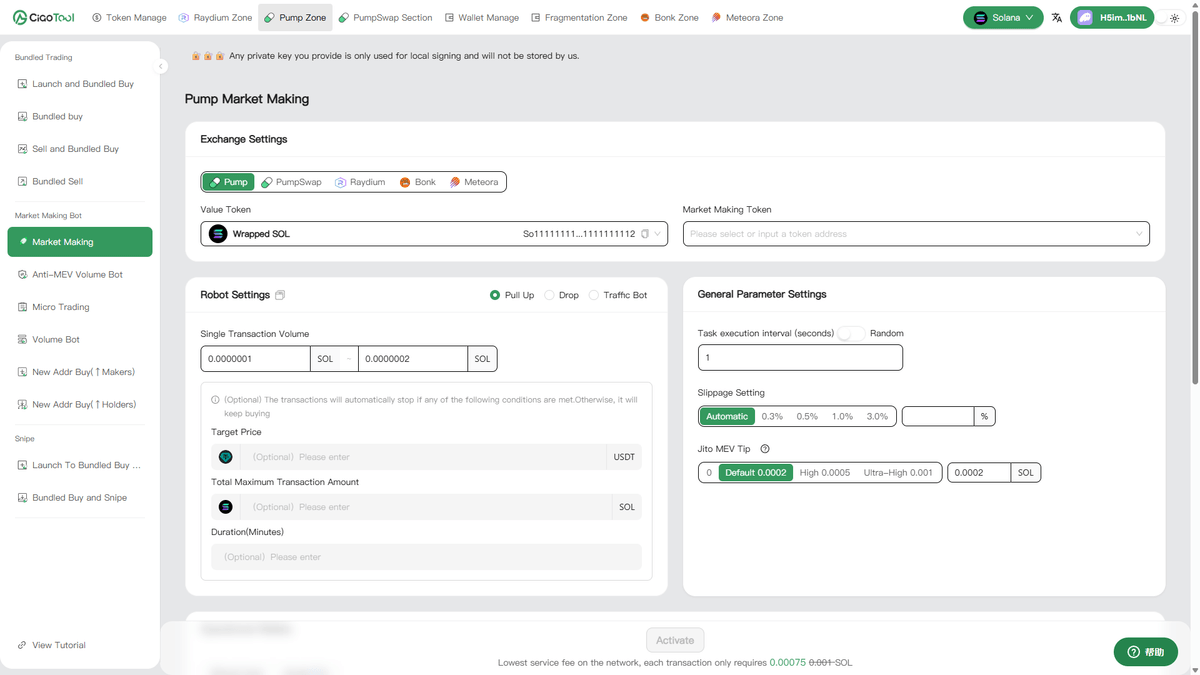
A PumpFun Volume Bot is an automated trading tool designed to help manage transaction activity on Pump.fun. It allows users to configure trading parameters and execute automated buy and sell operations through multiple wallets.
Unlike manual trading, which requires constant monitoring and repeated actions, a volume bot uses predefined rules to control transaction frequency, trading amounts, wallet operations, and execution duration.
CiaoTool PumpFun Volume Bot is built for the Solana ecosystem and supports customized trading strategies for Pump.fun tokens. Users can configure parameters such as transaction range, execution time, and wallet settings to create a more efficient workflow for managing on-chain activity.
The tool supports different quote tokens, including official SOL and USDC, allowing users to select the appropriate payment token according to their trading requirements.
Why Use a Volume Bot on Pump.fun?
For newly launched tokens, maintaining consistent market activity can require significant operational effort.
Manually executing multiple transactions across different wallets is time-consuming and difficult to manage. A PumpFun Volume Bot simplifies this process by automating repetitive trading operations.
With automated execution, users can:
- Reduce manual trading workload
- Manage multiple wallets more efficiently
- Customize transaction frequency and amounts
- Create a structured trading workflow
The purpose of using a volume bot is not simply to execute transactions, but to provide a more efficient way for teams to manage their token operations.
How to Set Up CiaoTool PumpFun Volume Bot
Setting up the PumpFun Volume Bot with CiaoTool only requires a few steps.
Connect Your Solana Wallet
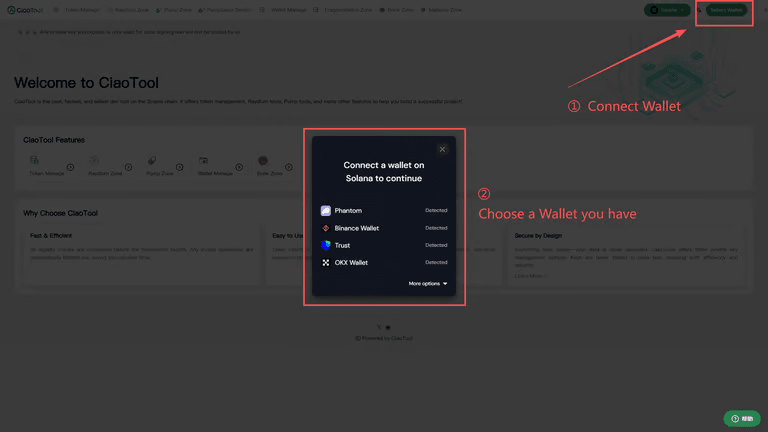
First, connect a wallet that supports the Solana network.
Click the wallet connection button in the upper-right corner and confirm the connection.
Select Your Value Token and Target Token

After connecting your wallet, select the tokens used for the operation.
The Value Token is the token used to pay for trading operations. CiaoTool currently supports major quote tokens such as SOL and USDC.
The Target Token is the Pump.fun token you want to manage.
You can either enter the token address manually or select a token already available in your wallet.
Choose Your Trading Strategy
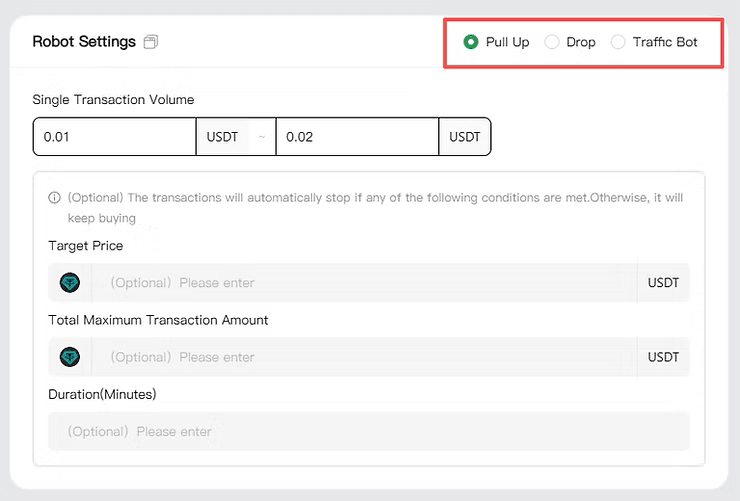
CiaoTool provides different strategy options depending on your operational goals.
The Trading Bot strategy executes both buy and sell transactions automatically based on your configured parameters. This allows users to maintain continuous trading activity without manually managing every transaction.
The Buy strategy focuses on continuous purchase operations, while the Sell strategy executes selling operations according to the selected settings.
Users can choose the appropriate mode depending on their token management requirements.
Configure PumpFun Volume Bot Parameters
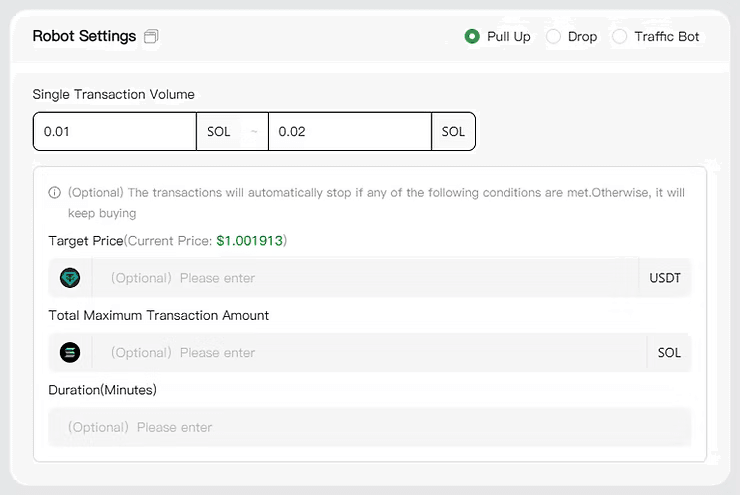
After selecting the appropriate strategy, you can customize the PumpFun Volume Bot parameters based on your trading requirements. CiaoTool provides three automation modes: Buy Mode, Sell Mode, and Trading Bot Mode.
Each mode allows users to configure transaction amounts, execution conditions, and running duration. The transaction amount can be set as a fixed value or a randomized range, while condition parameters such as target price, maximum transaction amount, and execution time allow the bot to automatically stop when predefined requirements are reached.
For Trading Bot Mode, users can configure both buy and sell transaction settings to automate two-way trading execution.
During operation, please keep the browser page open. Closing or refreshing the page will immediately stop the running strategy. For better execution stability, using the feature on desktop devices is recommended.
Import Wallets and Start the Bot
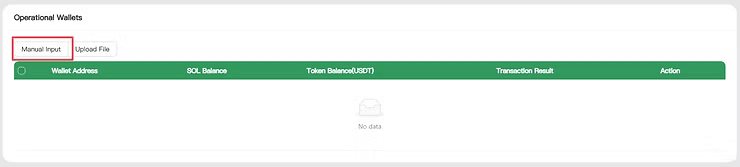
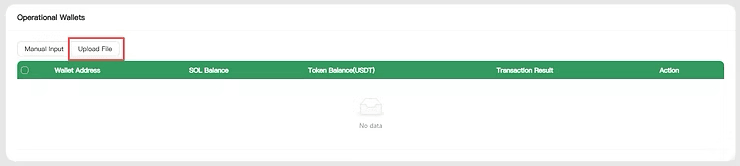
To perform automated trading operations, users need to import operation wallets.
CiaoTool supports two wallet import methods:
- Manual private key input
- File upload
- After importing wallets and confirming all settings, click the Start button to begin execution.
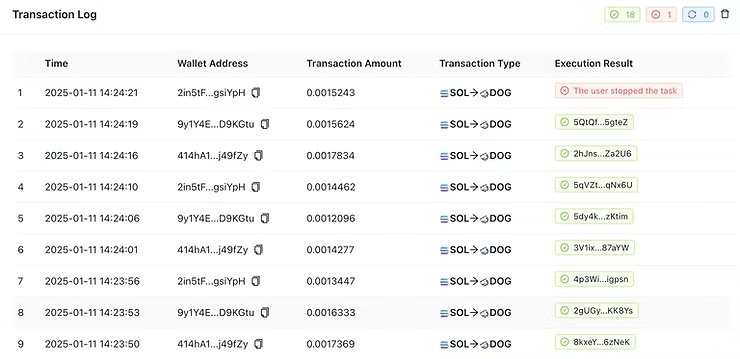
- During operation, users can monitor transaction records through the execution logs.
How Does PumpFun Volume Bot Work?
A PumpFun Volume Bot works by executing predefined trading strategies automatically.
After users configure the token, wallets, transaction amount, and execution conditions, the system follows these settings to perform transactions on-chain.
The workflow can be summarized as:
Configure trading parameters
- Import operation wallets
- Start automated execution
- Monitor transaction results
- By automating repetitive processes, the bot helps reduce operational complexity and allows teams to focus on broader token management strategies.
Things to Consider Before Using a PumpFun Volume Bot
Although automation can improve efficiency, proper configuration remains important.
Setting inappropriate transaction amounts or frequencies may create inefficient execution patterns or unnecessary costs.
Before running a PumpFun Volume Bot, users should consider:
Available liquidity conditions
- Wallet balances
- Network fees
- Trading parameters
- Overall market environment
A volume bot should be used as part of a broader token management strategy rather than as a standalone solution.
Security Features of CiaoTool PumpFun Volume Bot
Security is an important consideration when using automated trading tools.
CiaoTool uses a non-custodial architecture. User assets remain under wallet control, and transactions are signed through the user's environment.
The platform does not store user funds, providing users with greater control over their assets during automated operations.
Start Using PumpFun Volume Bot with CiaoTool
Managing Pump.fun trading activity does not need to rely entirely on manual operations.
With CiaoTool PumpFun Volume Bot, users can configure automated strategies, manage wallets efficiently, and streamline their on-chain trading workflow.
Start using CiaoTool PumpFun Volume Bot today.